AstroTrackerComing soon

Every sub, every night, every telescope. Accounted for.

AstroTracker reads the files your imaging rigs write and keeps a complete record of every project: integration by filter and night, sub quality, calibration, and what to shoot next. It watches your rigs through the night and tells your phone when something needs you.

Take the tour Join the Discord

For WindowsRuns on your own PCReads your files, never changes them

Built on a real library: the developer's own archive, in AstroTracker today

Files indexed
238,518
Hours of integration
6,748
Finished projects
283
Telescope and camera rigs
26

A tour of the app

From tonight's sky to a finished archive

Each tab below is AstroTracker as it is today, in its Glass look, photographed on the developer's own PC with five rigs set up for the night.

01Imaging

Every rig, live, on one page

Each rig's sequence, its progress per filter, guiding, focus and the latest sub, read from Sequence Generator Pro, N.I.N.A. and PHD2 as they work. With Sequence Generator Pro, start every rig when it gets dark, or the moment the sky clears, and stop and park them all from here.

  • Arm for dark, or for the clear sky your all-sky camera sees
  • Each rig's next meridian flip, counted down
  • Guiding RMS, star size and seeing from every sub
  • Each capture PC's drive space, and Windows Update kept from restarting it mid-sequence
  • An alert the moment a sequence stalls or guiding drifts
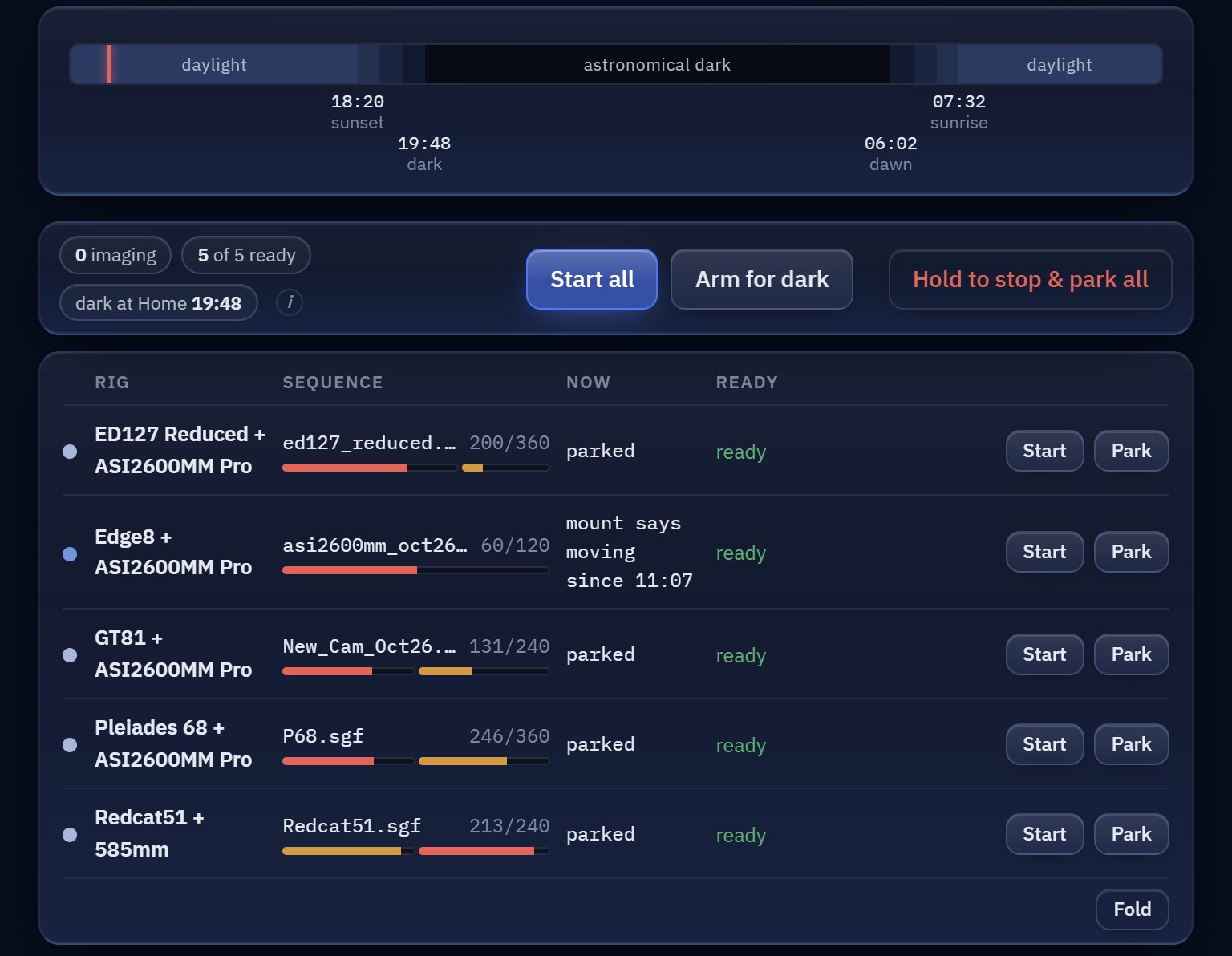
AstroTracker's Imaging tab before dark: tonight's dark hours, Start all, Arm for dark and Hold to stop and park all, and five rigs with their sequences' progress, each ready to start or park on its own

02Weather

Know what the sky will do tonight

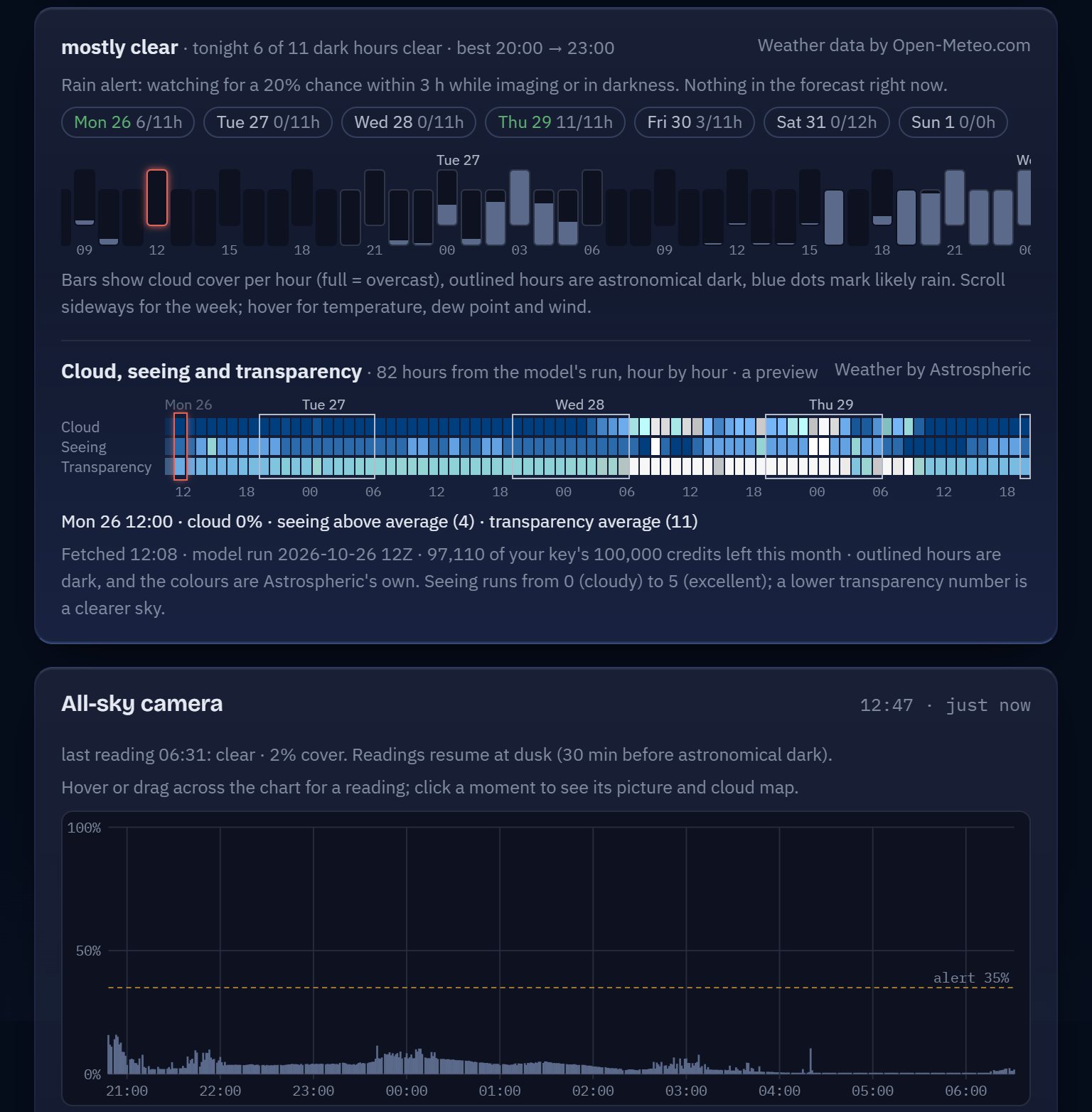
Cloud cover hour by hour for every dark hour of the week, and a rain alert while rigs are out. Add your own Astrospheric key for seeing and transparency, or an all-sky camera to watch the clouds themselves.

  • Clear dark hours for each night ahead
  • Rain alerts while rigs are imaging or set up
  • All-sky cloud watch, and a ping when it clears
  • Seeing measured from the stars in your own subs
AstroTracker's Weather tab: a mostly clear night ahead and the clear hours of each night of the week, hourly cloud cover, Astrospheric's cloud, seeing and transparency, and last night's cloud cover as the all-sky camera saw it

03Planning

Plan the next clear night

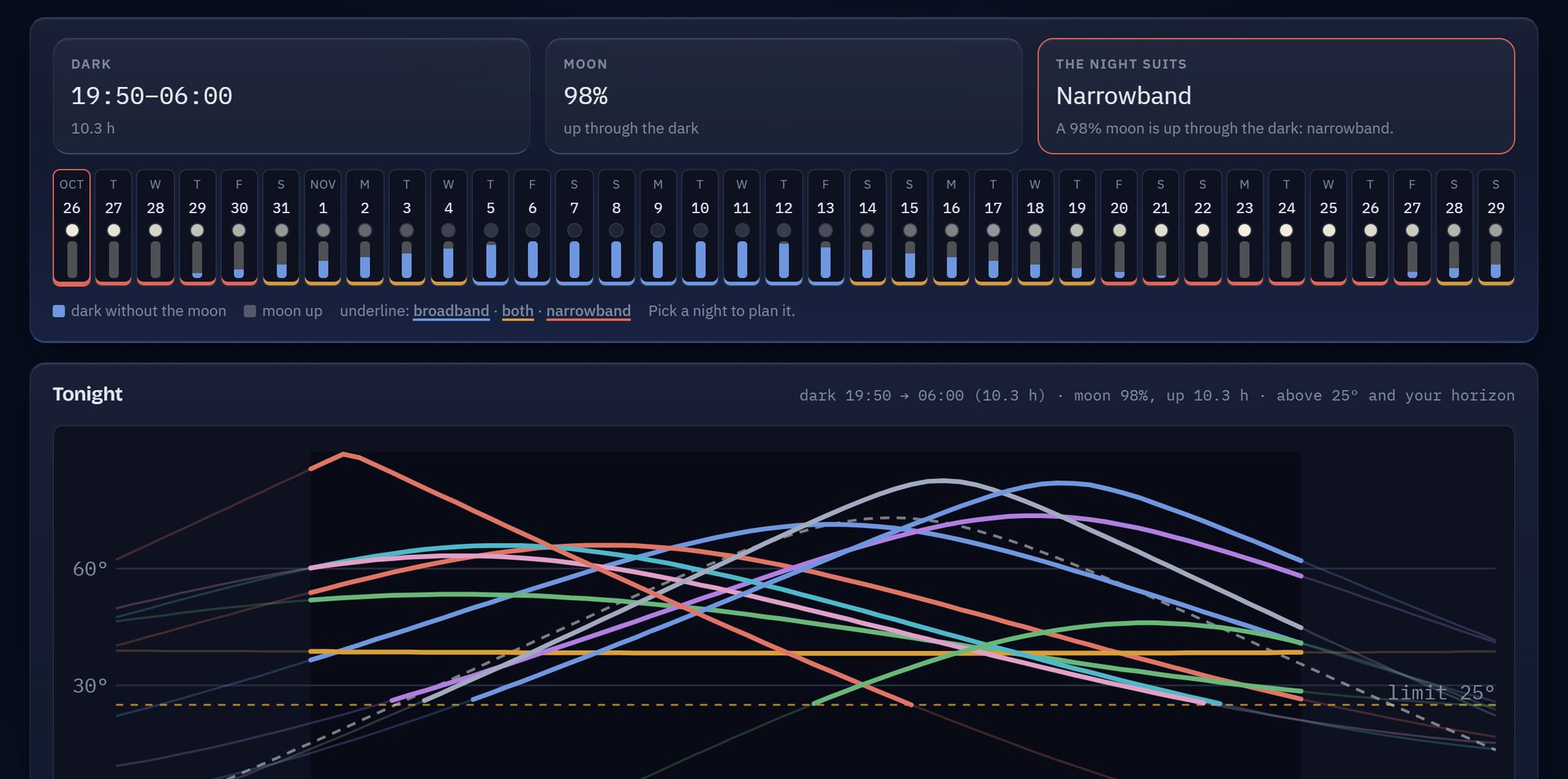
When it gets dark, what the moon allows and when each target clears your horizon, for every night of the month. AstroTracker suggests targets you have never imaged, suited to each telescope's field and tonight's moon.

  • A month of nights: dark hours, moonlight, broadband or narrowband
  • Every planned target's altitude through the night
  • Checklists: Messier, Caldwell, Sharpless and more
AstroTracker's Planning tab: tonight's dark hours, a bright moon and a night for narrowband, a month of nights, and the altitude of eleven planned targets through the night

04Active

Know where every project stands

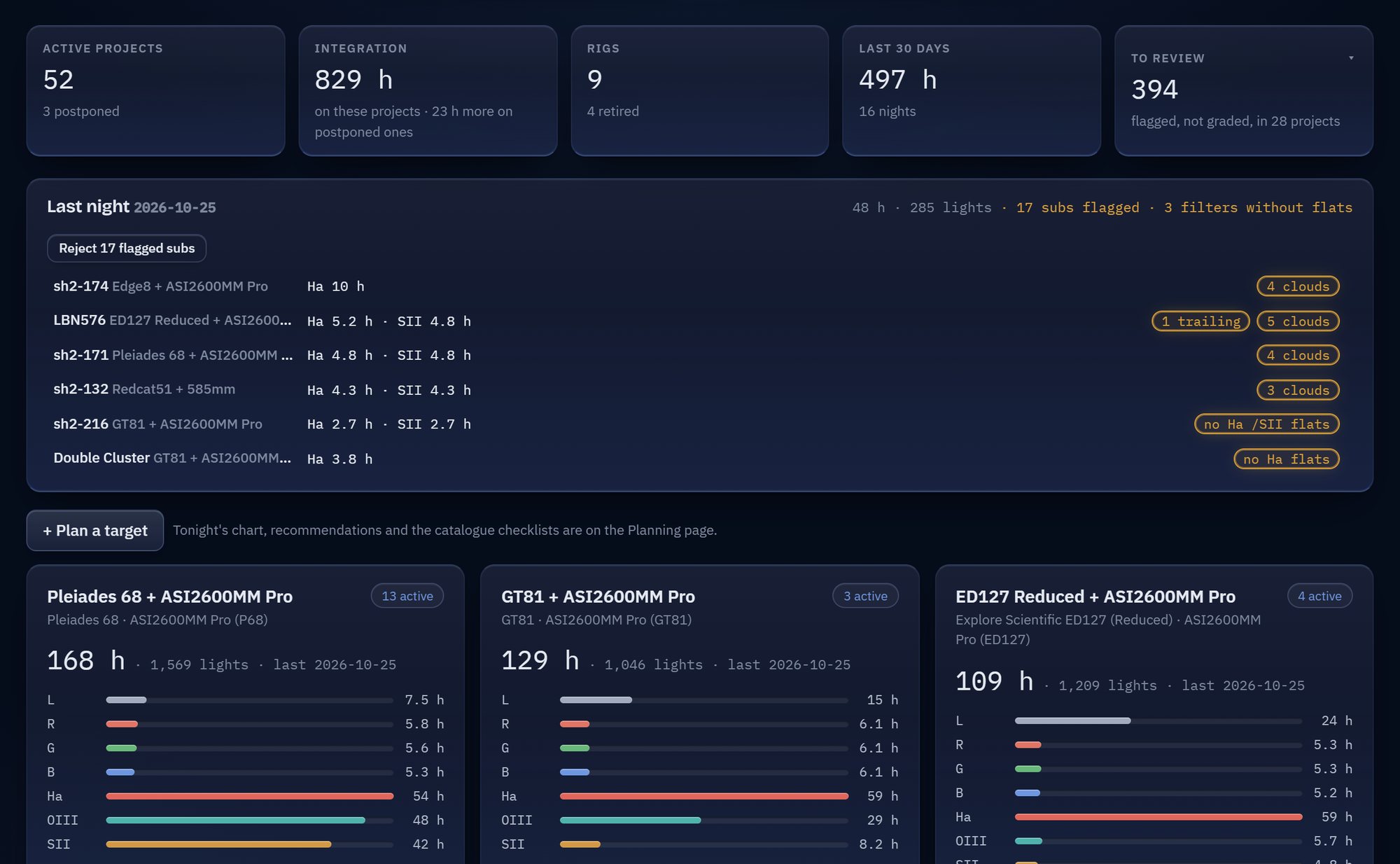
The Active tab is the morning view: every project in progress, grouped by telescope with its integration per filter, and last night's results above them. What each rig captured, which subs look clouded or trailed, and which filters still need flats.

  • Totals by target, filter and telescope
  • Last night's results, waiting in the morning
  • Flagged subs rejected in one click
  • Each morning, last night's report: a row per rig, and any time lost and why
AstroTracker's Active tab: 52 active projects, 829 hours on them, 497 hours in the last 30 days, the subs waiting to be reviewed, last night's results with flags for cloud, trailing and missing flats, and integration per filter for each telescope

05Finished

Years of nights, accounted for

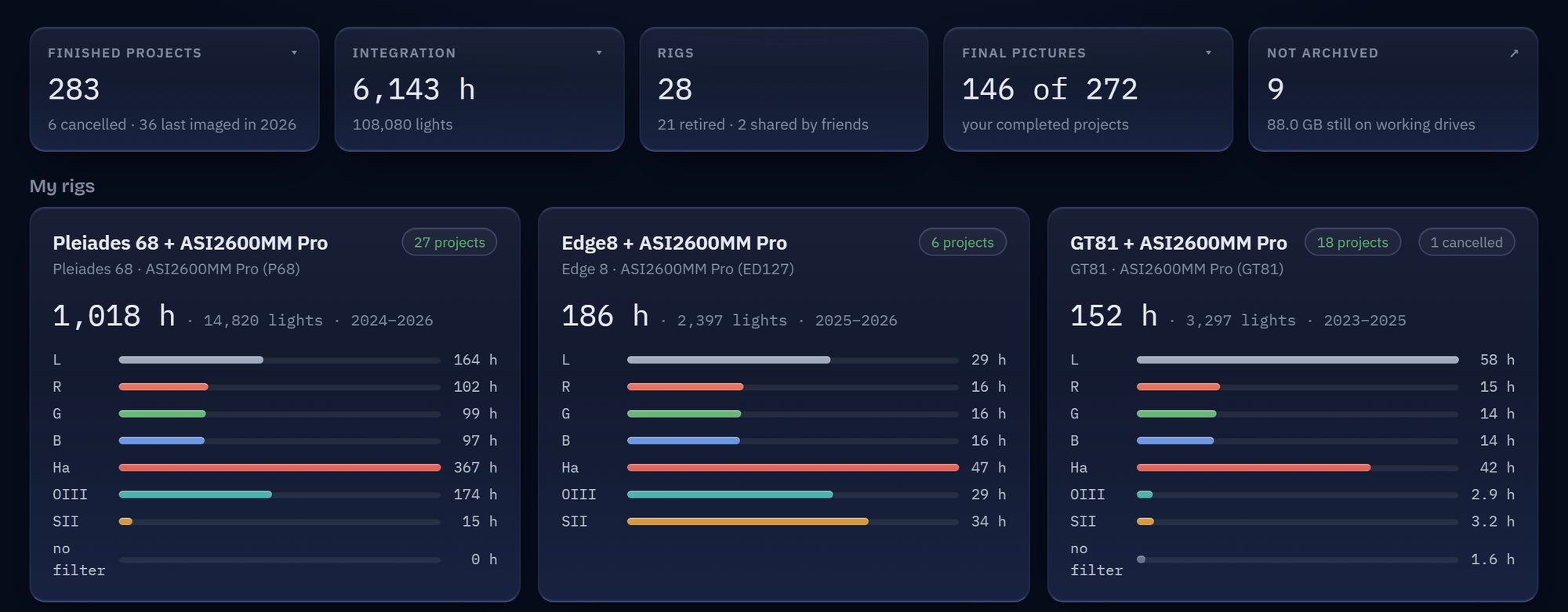
Every completed project, telescope by telescope: the hours behind it per filter, the final pictures, and what still sits on a working drive waiting to be archived.

  • Every finished hour, by rig and filter
  • Final pictures kept with their projects
  • What is not archived yet, and the space it takes
  • Set a project Complete, and its archive is offered there and then
AstroTracker's Finished tab: 283 finished projects, 6,143 hours, final pictures for 146 of them, and each rig's finished hours per filter

06Organize

Tidy files, safely

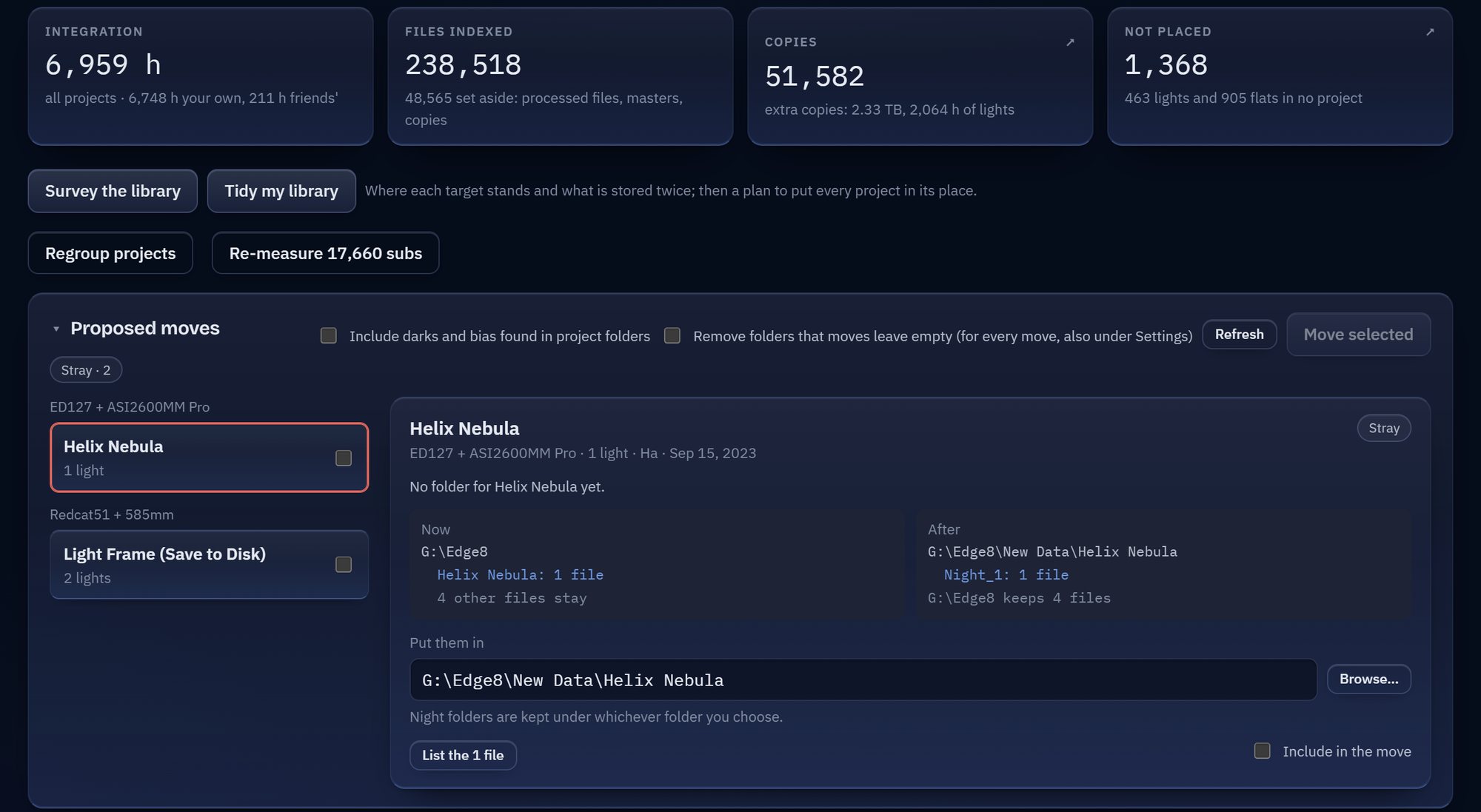
Your library at a glance, then the work: AstroTracker finds subs filed under the wrong target, strays, and targets sharing a folder, and archives finished projects into one layout. Nothing moves until you tick it and confirm.

  • The whole library's hours, files and copies, with Survey and Tidy my library
  • Misfiled and stray subs found by their headers
  • Finished projects archived; copies set aside, never deleted
  • A preview before, an undo after. Your image files are never modified.
AstroTracker's Organize tab: the library's 6,959 hours and 238,518 files, Survey the library and Tidy my library, and the proposed moves grouped by telescope, one opened to show where its sub sits now and where it would go

The iPhone app

Your rigs, in your pocket

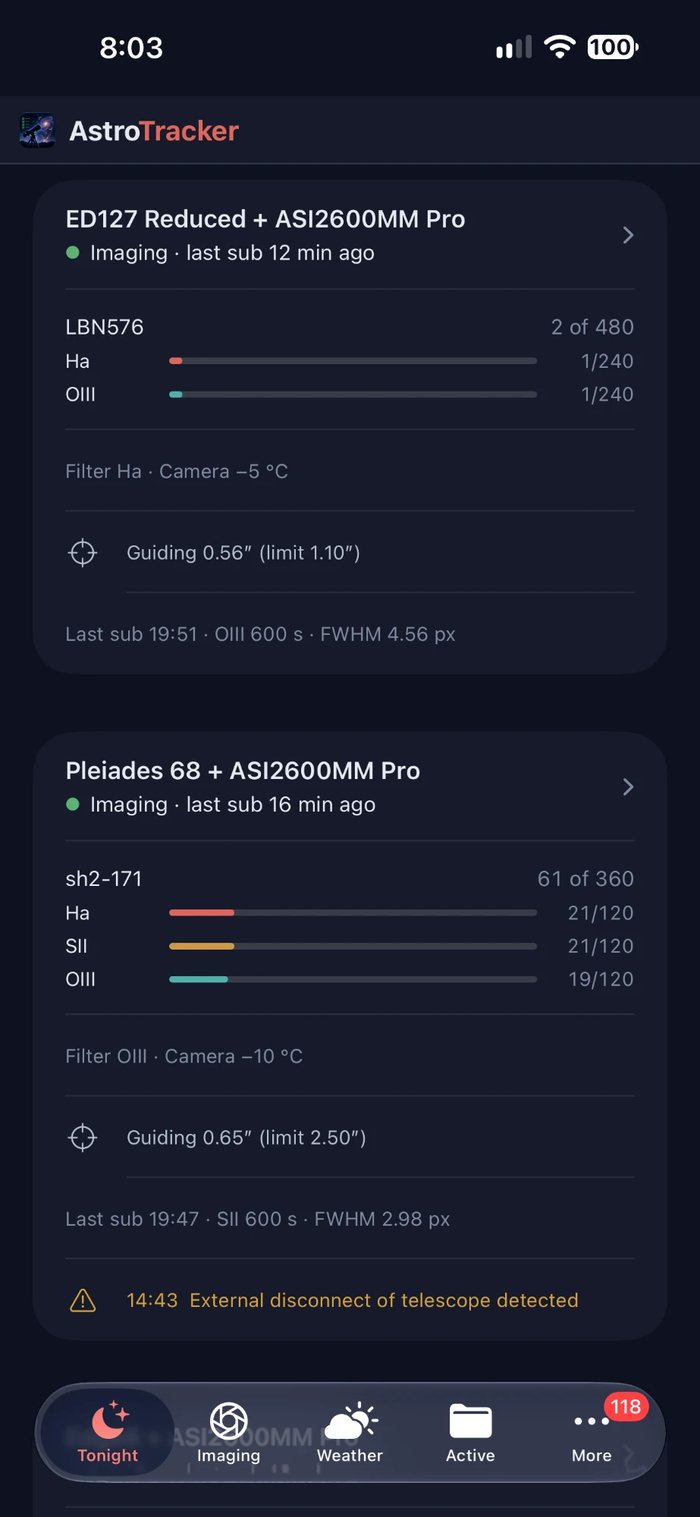
AstroTracker's iPhone app pairs with AstroTracker on your PC by scanning a code. Its Tonight screen shows every rig at a glance, AstroTracker's own pages are a tab away, and its alerts reach you wherever you are.

  • Tonight: each rig's state and target, the dark hours, the moon and rain
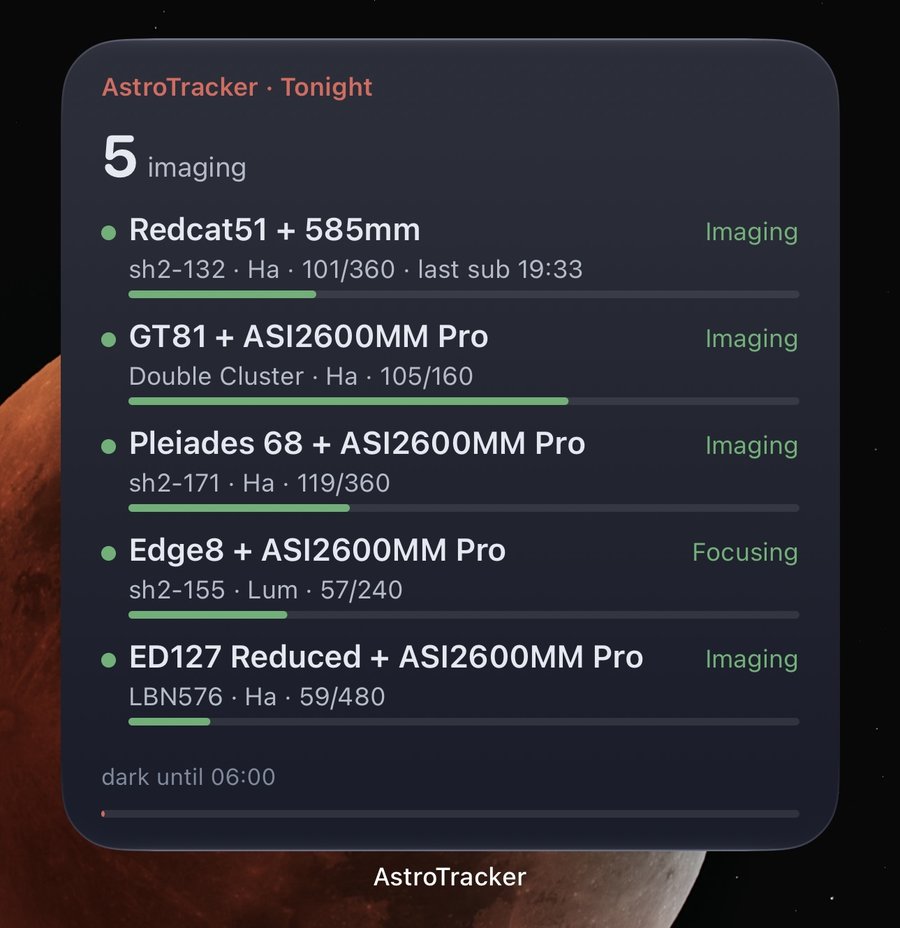
  • Lock screen and home screen widgets, brought up to date by every alert
  • Alerts sealed on your PC, so that only your phone can read them
  • A sound for each kind of alert, and the urgent ones can break through Focus

Coming soon to the App Store

No iPhone? Any phone's browser can open AstroTracker's pages at home, and the free ntfy app takes its alerts.

The iPhone app's Tonight screen: the ED127 Reduced and the Pleiades 68 imaging, each with its target, its progress per filter, its guiding and its last sub
Tonight
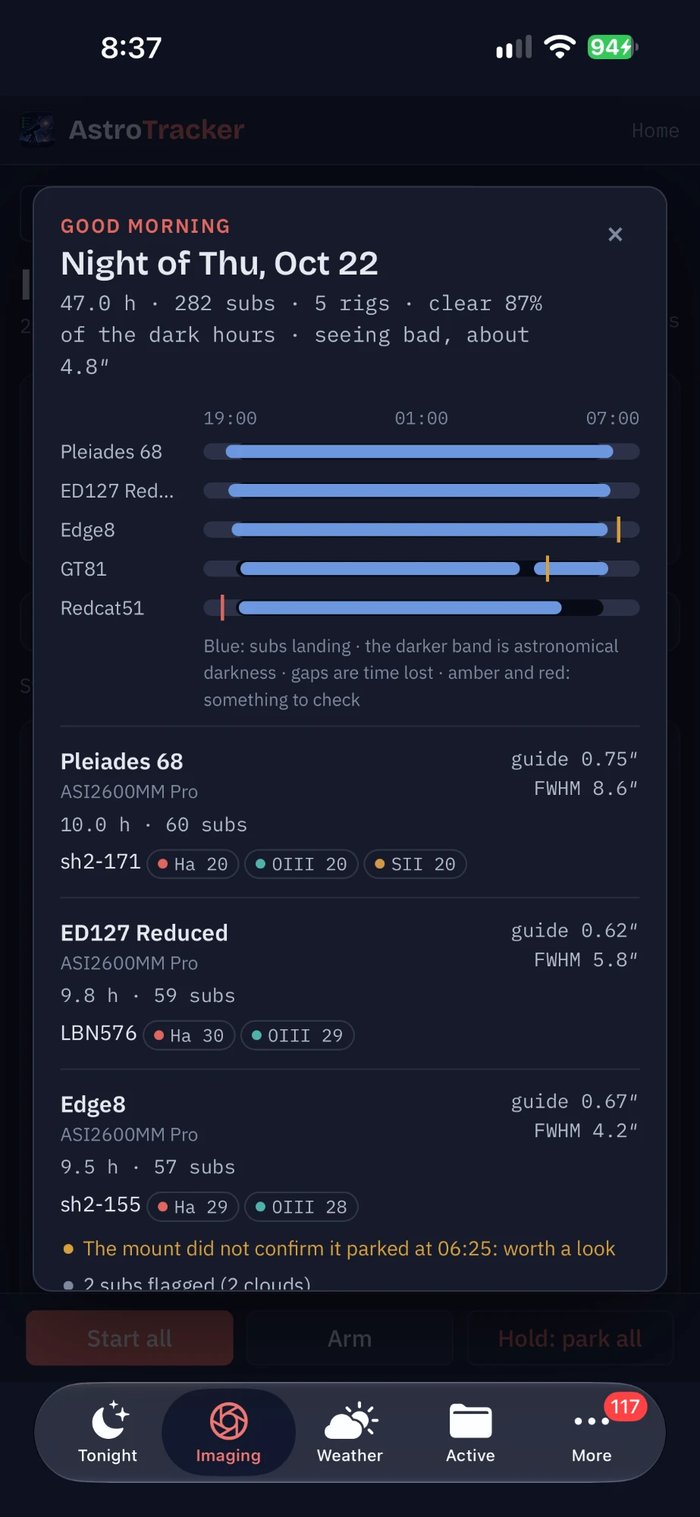
The morning report in the iPhone app: last night's 47 hours over five rigs, when each rig's subs were landing, and a row per rig with its targets, filters, guiding and anything worth a look
The morning report
The large Tonight widget on an iPhone home screen: five rigs imaging, each with its target, filter and progress
Widgets for the home screen and the lock screen, showing every rig or just one.
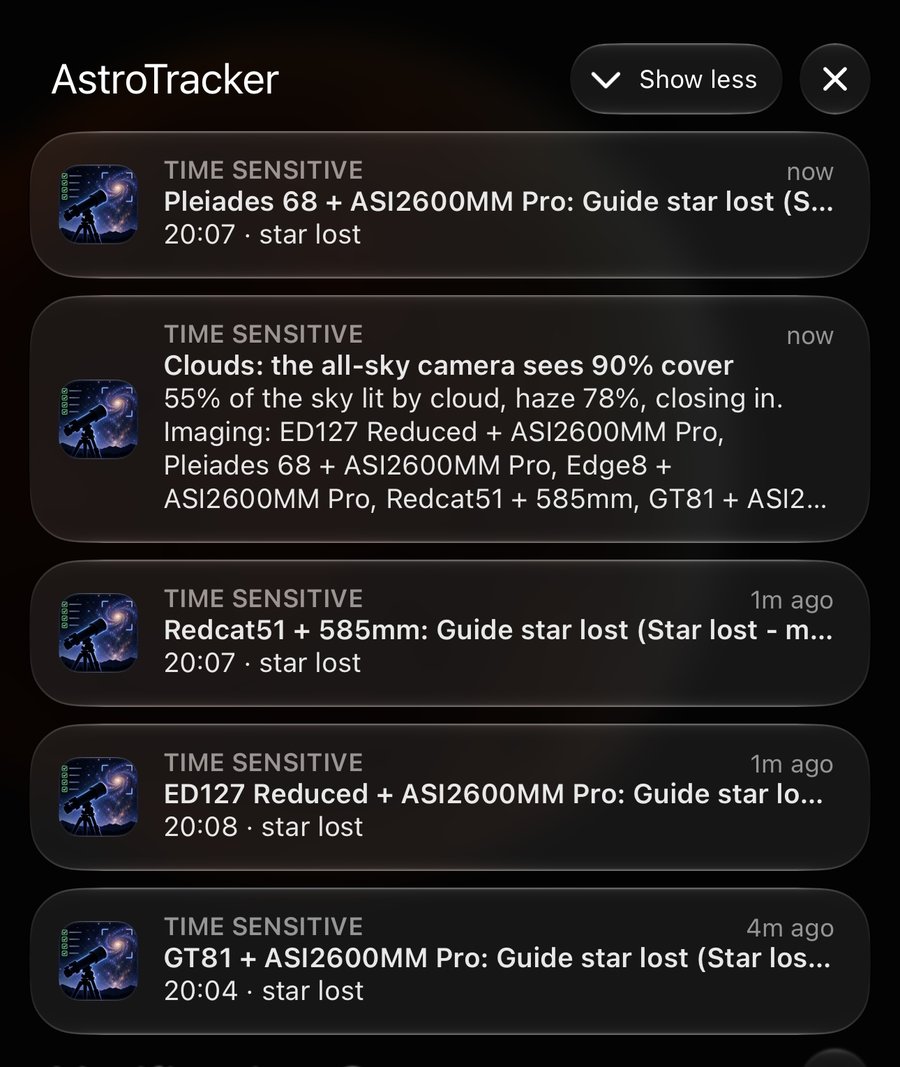
Time Sensitive notifications from AstroTracker: guide stars lost on four rigs as the all-sky camera sees 90% cloud cover
Time Sensitive alerts that come through Focus: here, guide stars lost as cloud rolled in.
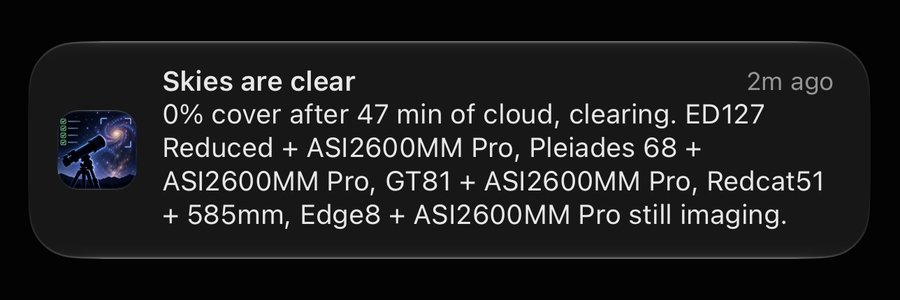
A notification from AstroTracker: skies are clear, 0% cover after 47 minutes of cloud, five rigs still imaging
And the all-clear when it has gone. Arm for a clear sky can start your rigs by itself.

Inside every project

The whole record, and the calibration behind it

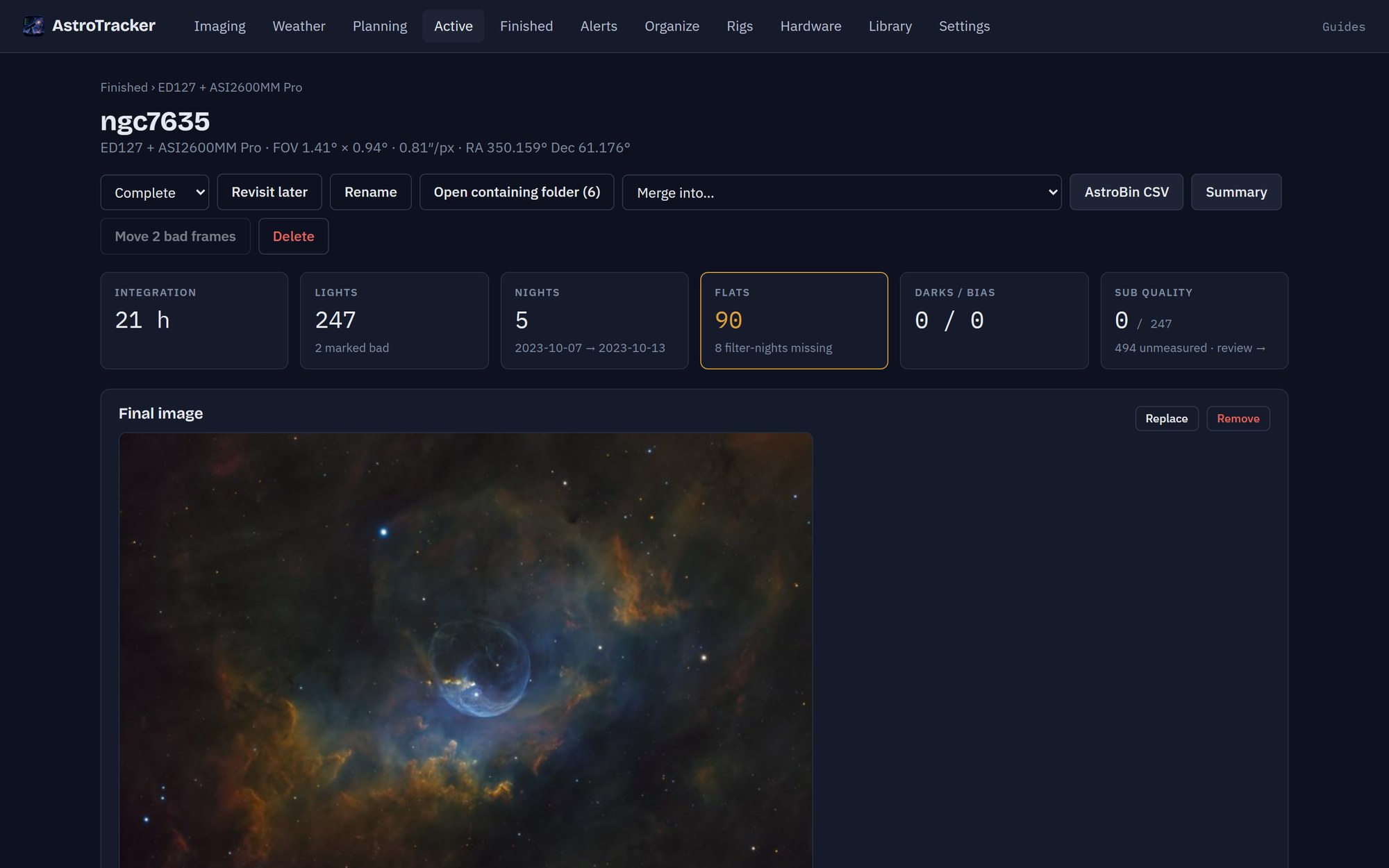
A project in AstroTracker: integration, lights, nights, flats, darks and sub quality above the finished picture of the Bubble Nebula

The record

Integration, subs kept, nights and calibration, with the finished picture alongside. Goals per filter show how far each project has to go, and every record in this site's gallery comes straight from here.

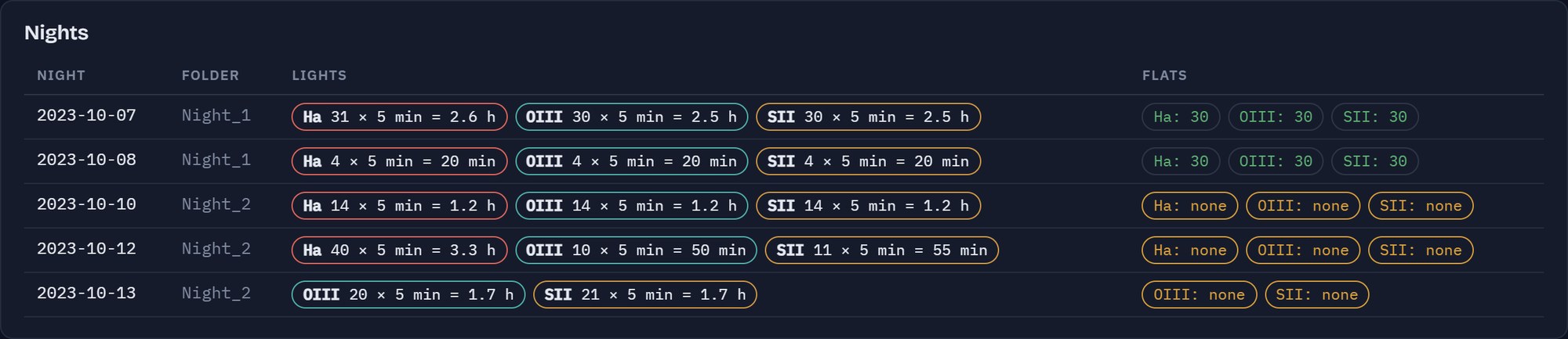
AstroTracker's night-by-night table: subs per filter each night, and the flats that cover them

Calibration

Night by night, what each filter collected and whether flats cover it. Missing flats, darks at the wrong temperature and a gain or offset that quietly changed are flagged while there is still time to fix them.

  • Every sub counted once; rejected subs add no time
  • Darks and bias matched on temperature, gain and offset
  • AstroBin acquisition details in one click

And there's more

How much more?

Measures the faint detail in your subs and estimates the hours still needed for a clean result.

Capture PCs

Each capture PC reports its drive space and logs through a folder you already sync, and Windows Update is kept from restarting it at night.

Library survey

Finds your past processing, from WBPP runs to PixInsight projects and finished pictures, and every capture stored twice.

Your look

Glass or Classic, and a loading screen of your choice: a telescope locking on, a galaxy coming out of the noise, and more.

Rigs by fingerprint

Each rig is recognised by focal length, pixel size and sensor, whatever the capture program calls it.

Backups

AstroTracker backs up its own record to a folder you choose, and checks every copy it makes.

Your data stays yours

AstroTracker runs on your own PC. It only ever reads your image files, never changes them, and nothing leaves your computer unless you switch a feature on.

The guide

AstroTracker Explained

A friendly guide to everything AstroTracker does, and why, written for anyone new to astrophotography.

Coming soon

AstroTracker is in beta testing now, ahead of its public release. It isn't available to download yet, but you're welcome to ask to join the beta, and to join the community on Discord.

Join the Discord

Request to join the beta

AstroTracker is being tested by a small group of imagers ahead of its public release. Tell me a little about yourself and your setup, and I'll be in touch by email.

Sent to me by email through Web3Forms. Your name and email are used only to reply to you about the beta.